
Purpose and problem
Exporting a project requires loading its assets, resolving references, rendering pages, packaging files, and writing a destination. Every screen that offers Export learns the same sequence. Some forget a validation step; others make different assumptions about temporary-file cleanup. The subsystem works, but its callers must understand too much of it.
Core idea
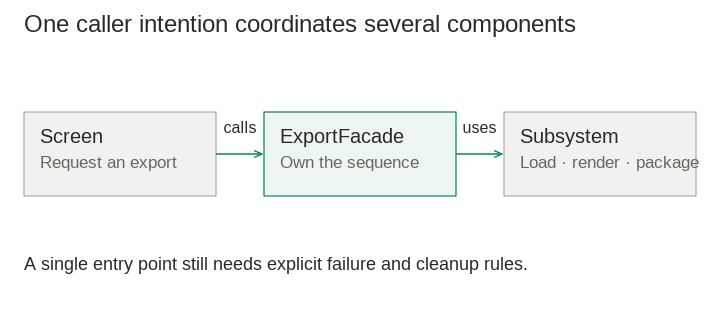
Facade gives those callers a focused entry point. An ExportFacade might expose export_project(project_id, destination), coordinate the relevant components, and return a meaningful result. Clients can request the outcome without reproducing the subsystem's internal procedure.
How it works
A facade is an interface to a subsystem, not necessarily a separate abstract type or an enormous class. It can be a small object, module, or function group. Its role is to present the level of detail appropriate to its clients.
The underlying components can remain available to specialized callers. A rendering tool might need direct access to page rendering, while an ordinary application screen needs only the complete export operation. Facade does not require making every internal API private or forcing every user through one path.
The benefit comes from concentrating routine coordination and reducing the number of details clients must depend on. Internal changes can then stay inside the boundary if the externally promised behavior remains stable.
Worked example
Project export as one coherent operation
Before introducing the facade, three screens call AssetLoader, ReferenceResolver, Renderer, Packager, and DestinationWriter independently. A new packaging rule requires editing all three. Their tests construct five dependencies even when the behavior under test is simply whether clicking Export starts an export.
Afterward, the screens depend on an export interface. The facade owns the shared sequence, and its focused tests verify coordination. Screen tests supply a controlled export implementation and check the interaction at the boundary they actually care about.
The facade still needs to expose useful failures. Invalid project content, an unavailable destination, and a failed rendering step may demand different user responses. Returning one generic error string would simplify the signature while making the application less capable of recovering.
Cleanup is part of the operation's meaning. If temporary files are created, the facade should coordinate their removal on failure where appropriate. If partial output can remain at the destination, that should be represented in the result or handled through a deliberate commit mechanism. A single method call does not imply atomic execution.
A small implementation
The export facade gives a screen one operation instead of a sequence of subsystem calls. The functions here use in-memory values so their order and return behavior can be inspected without files or external services.
def load_assets(project):
    return project["pages"]


def render_pages(pages):
    return [page.upper() for page in pages]


def package_pages(pages):
    return "\n".join(pages).encode("utf-8")


class ExportFacade:
    def export_project(self, project):
        assets = load_assets(project)
        rendered = render_pages(assets)
        return package_pages(rendered)


artifact = ExportFacade().export_project({"pages": ["Cover", "Notes"]})
print(artifact.decode("utf-8"))
# COVER
# NOTES
The caller requests an export while the facade owns routine collaboration. These subsystem operations may still be used directly by specialized tools. A real exporter must define failures, cleanup, and partial output; presenting one method does not turn the sequence into a transaction.
A local development environment
A development tool starts a database, checks readiness, runs migrations, loads optional seed data, and launches an application server. Without a boundary, command-line handlers and graphical controls both understand process launching and readiness checks.
A DevelopmentEnvironment facade offers start and stop operations. It delegates to narrower components for process management, migration execution, and configuration. The caller receives status that describes the environment rather than a collection of raw process handles.
This reduces repeated wiring and gives shutdown order a clear owner. The application server can stop before the database, and failures can be reported with enough context to identify the stage involved.
However, the facade should not hide relevant choices such as whether to load seed data or use an existing database. A simplified interface remains useful only if its defaults fit callers' actual needs. One clear options value may be better than a growing collection of nearly identical start methods.
When to use it
- Clients repeatedly coordinate the same subsystem operations.
- Most callers need a simpler view than the full subsystem API.
Consider a simpler design when the interface would conceal essential failure or consistency information, or when the facade is becoming a universal service for unrelated operations.
Tradeoffs and common mistakes
Facade helps when a subsystem has a meaningful overall purpose and clients repeat the same collaboration sequence. It can provide a stable boundary for application layers and make dependency wiring easier to understand.
It becomes less useful when it merely forwards dozens of internal methods with slightly different names. That wrapper adds indirection without reducing conceptual load. A worthwhile facade should organize operations around caller intentions, such as export a project or start an environment.
Another failure mode is the application-wide facade that grows into a service for everything. Unrelated responsibilities become concentrated behind one convenient dependency. Splitting by cohesive subsystem or use case usually keeps the boundary more understandable.
Observability also matters. If the subsystem performs several slow operations, callers may need progress events, cancellation, or structured diagnostic information. These can coexist with a focused interface. Hiding implementation objects does not require hiding operational visibility.
Related patterns
Adapter translates an existing interface into another expected contract. Facade supplies a simpler view over a subsystem that may not have any direct compatibility mismatch. A facade can use adapters internally to integrate individual components.
Mediator coordinates interactions among peer objects, often receiving events and directing their collaboration. Facade primarily gives outside clients a convenient way to use a subsystem. Both coordinate work, but their relationships to callers differ.
Abstract Factory supplies compatible products during construction. A facade might be one product in such a family or use a factory internally; its distinctive role is simplifying use rather than selecting concrete implementations.
Sources
Facade is one of the 23 patterns in Gamma, Helm, Johnson, and Vlissides, Design Patterns: Elements of Reusable Object-Oriented Software. The examples, code, and illustrations here are original educational explanations.