
Purpose and problem
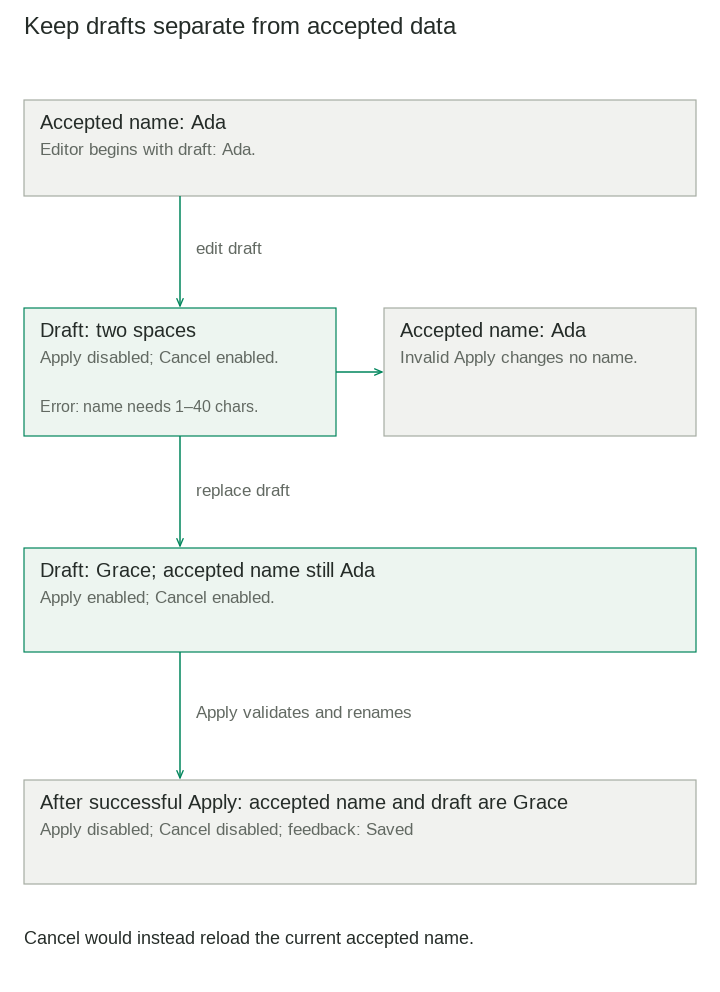
A profile editor shows a name, an error message, and Apply and Cancel buttons. Typing blanks should display a useful error without replacing the valid saved name. Applying valid text should clear the dirty state. Cancelling should restore the saved value.
When the text box holds the only draft and each event handler decides which buttons to enable, those rules become difficult to test without opening the window. Rebuilding the screen with different controls means reconstructing its behavior from scattered widget code.
Core idea
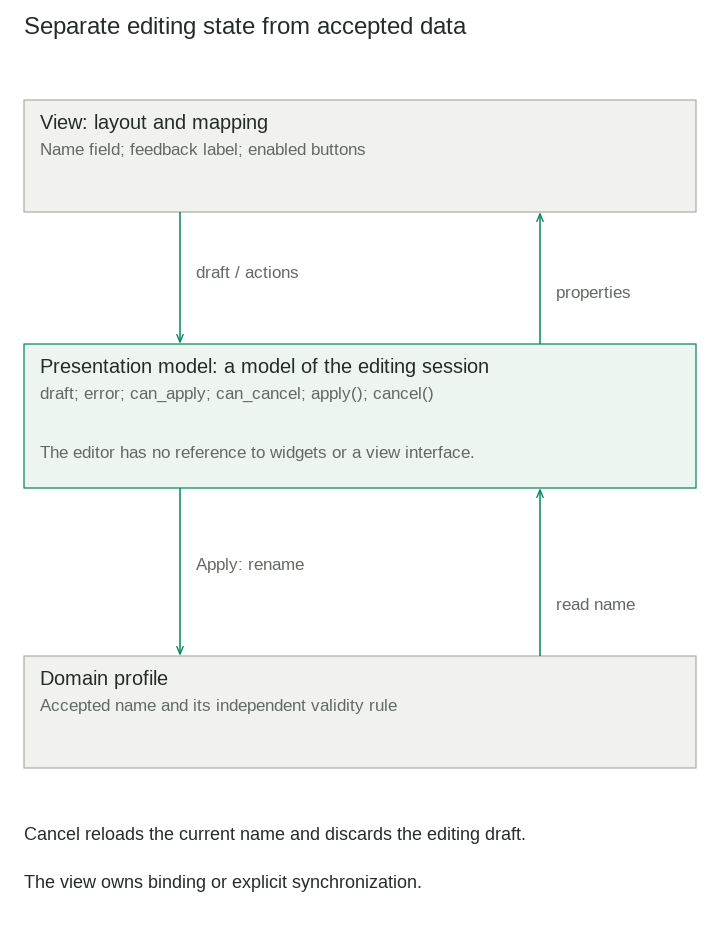
A Presentation Model represents the screen's changing state and behavior independently of its controls. It exposes draft values, validation feedback, selection, command availability, and actions. The view maps those properties to widgets and routes interaction back to the presentation model.
The mental model is a model of the editing experience, separate from the business object being edited. Martin Fowler's catalog entry describes this separation and lists Model-View-ViewModel (MVVM) as another name.
John Gossman's original MVVM introduction places particular emphasis on declarative views, binding, presentation-specific transformations, and commands. MVVM is commonly a binding-oriented realization of this idea. The broader pattern also permits explicit synchronization; using the name does not install a binding engine.
How it works
Distinguish accepted data from an editing draft
The domain profile owns a valid name and enforces its rule whenever renamed. The presentation model owns temporary text, feedback, and the decision to offer Apply or Cancel. An invalid draft is a legitimate editing state, not an invalid domain object.
Here Apply is enabled only when normalized text is valid and differs from the accepted name. Cancel compares the raw draft with that name, so it can discard extra spaces even when Apply would make no meaningful change. Those are explicit interaction policies, not universal MVVM rules.
Define the synchronization contract
The view writes input to the draft, reads display properties, and invokes actions. In MVVM frameworks, bindings and change notifications often automate that mapping. Microsoft's MVVM guidance describes view-model properties and commands without references to concrete controls.
Derived values need notification too: changing a draft can change its error and Apply availability. Update a coherent state before notifying observers. A notification does not guarantee atomic repaint across widgets.
Binding direction and timing matter. WPF's source-update documentation distinguishes updates while typing, on focus loss, and explicitly. Otherwise Apply can read yesterday's draft while today's text remains in the control. Avoid feedback loops when copying values back into fields.
Make actions and ownership explicit
An enabled button is a hint; the action must still validate its input. Microsoft's RelayCommand documentation also makes command-availability notification explicit. A framework will not necessarily infer every dependency between a draft and a command.
Create one editing-session instance per independently editable form. Disposing a real view should release subscriptions and cancel or disregard outstanding work. For asynchronous saves, define busy state, UI-thread delivery, and how stale completions are rejected.
This example is sequential and in memory. It supplies no persistence or concurrent-edit protection. Cancel reloads the current domain name; it does not reverse a save. Saving or retrying against a remote service requires a separate failure and concurrency policy.
Worked example
An editable name with explicit synchronization
Before the change, the text box and its handlers own the draft and dirty checks. Afterward, ProfileEditor exposes those decisions without a view dependency. Save both files together and run python3 demo.py with Python 3.10+; no packages are needed.
Names contain 1–40 Unicode code points after trimming outer whitespace. This is an illustrative business rule. The presentation draft preserves raw text. The console view deliberately pulls properties after every interaction; it models a binding boundary without implementing notifications or a GUI toolkit.
editor.py — domain rule and presentation state
class InvalidName(ValueError):
    pass


def checked_name(text):
    if type(text) is not str or not 1 <= len(text.strip()) <= 40:
        raise InvalidName("Name must contain 1–40 characters")
    return text.strip()


class Profile:
    def __init__(self, name):
        self.rename(name)

    @property
    def name(self):
        return self._name

    def rename(self, text):
        self._name = checked_name(text)


class ProfileEditor:
    def __init__(self, profile):
        self._profile = profile
        self._draft = profile.name
        self.message = ""

    @property
    def draft(self):
        return self._draft

    @draft.setter
    def draft(self, text):
        if type(text) is not str:
            raise TypeError("Draft must be text")
        self._draft = text
        self.message = ""

    @property
    def error(self):
        try:
            checked_name(self.draft)
        except InvalidName as error:
            return str(error)
        return ""

    @property
    def can_apply(self):
        return not self.error and checked_name(self.draft) != self._profile.name

    @property
    def can_cancel(self):
        return self.draft != self._profile.name

    def apply(self):
        try:
            if checked_name(self.draft) == self._profile.name:
                self.message = "No changes"
                return False
            self._profile.rename(self.draft)
        except InvalidName as error:
            self.message = str(error)
            return False
        self._draft = self._profile.name
        self.message = "Saved"
        return True

    def cancel(self):
        self._draft = self._profile.name
        self.message = "Discarded"
demo.py — a view pulls properties; actions never call the view
from editor import Profile, ProfileEditor


profile = Profile("Ada")
editor = ProfileEditor(profile)


def show():
    print(repr(editor.draft), editor.can_apply, editor.can_cancel,
          profile.name, editor.error or editor.message or "Ready", sep=" | ")


show()
editor.draft = "  "
editor.apply()
show()
editor.draft = "Grace"
show()
editor.apply()
show()
editor.draft = "Lin"
editor.cancel()
show()
# 'Ada' | False | False | Ada | Ready
# '  ' | False | True | Ada | Name must contain 1–40 characters
# 'Grace' | True | True | Ada | Ready
# 'Grace' | False | False | Grace | Saved
# 'Grace' | False | False | Grace | Discarded
The domain name printed here is diagnostic evidence, not a proposed binding directly to the profile. Invalid Apply leaves it unchanged. Tests can inspect the editor without constructing a mock window. Actual bindings, keyboard behavior, and error accessibility still need real-view checks.
A search screen has presentation state too
A search view model might own a query, selected result, loading flag, and error, while the search service owns retrieval. Selection is not necessarily a domain fact. If responses arrive out of order, a request token or cancellation policy must keep an earlier query from replacing newer results; the pattern alone supplies no ordering guarantee.
When to use it
Use this separation when editing drafts, dependent fields, selection, validation, and command availability form substantial behavior. It helps when tests should exercise that behavior without widgets or when a view needs redesigning around the same interaction model.
A static display or trivial form may need only a few functions. Avoid creating a property for every visual constant or duplicating an entire domain object graph in view models.
Tradeoffs and common mistakes
Synchronization is real work. Missing notifications leave stale labels; incorrect mappings can update the wrong property even while presentation-model tests pass. Keep a small set of adapter or binding checks.
Do not bind editable fields straight into accepted domain state when Cancel must discard drafts. Conversely, drafts can become stale when something else changes the domain object. This example deliberately has no version check and must not be treated as a safe shared editor.
Avoid putting controls, layout coordinates, or every workflow into one view model. Retain domain validation and application-service boundaries. If painting fails after Apply succeeds, rebuild the display from current state rather than blindly repeat a save.
Related patterns
Model-View-Controller separates state, display, and input responsibilities. Presentation Model specifically gives UI state and behavior a widget-independent home.
Model-View-Presenter can direct a passive view through update calls. Here the view pulls properties and invokes actions; the editor never calls a view interface.
Domain Model owns accepted business state and invariants. An editing draft and button availability belong to the presentation side.
Observer can carry change notifications. It does not determine which properties depend on a change, nor provide disposal or ordering automatically.
Sources
Fowler's Presentation Model and Gossman's MVVM introduction establish the lineage. The linked Microsoft MVVM, WPF binding, and command documentation support the implementation distinctions.
The profile-editor scenario, search-screen explanation, Python code, and illustrations are original teaching material.