
Purpose and problem
A product page begins as a few strings joined in a request handler. Adding a stock label, changing heading structure, and adjusting spacing requires editing a mixture of HTML punctuation and application code. A product named A&B <Lab> then breaks the intended display because its characters are interpreted as markup.
The team needs to change the page's structure without rewriting data retrieval, while inserting each product's values correctly. Moving string concatenation into another function helps organization but still leaves the page difficult to read as a page.
Core idea
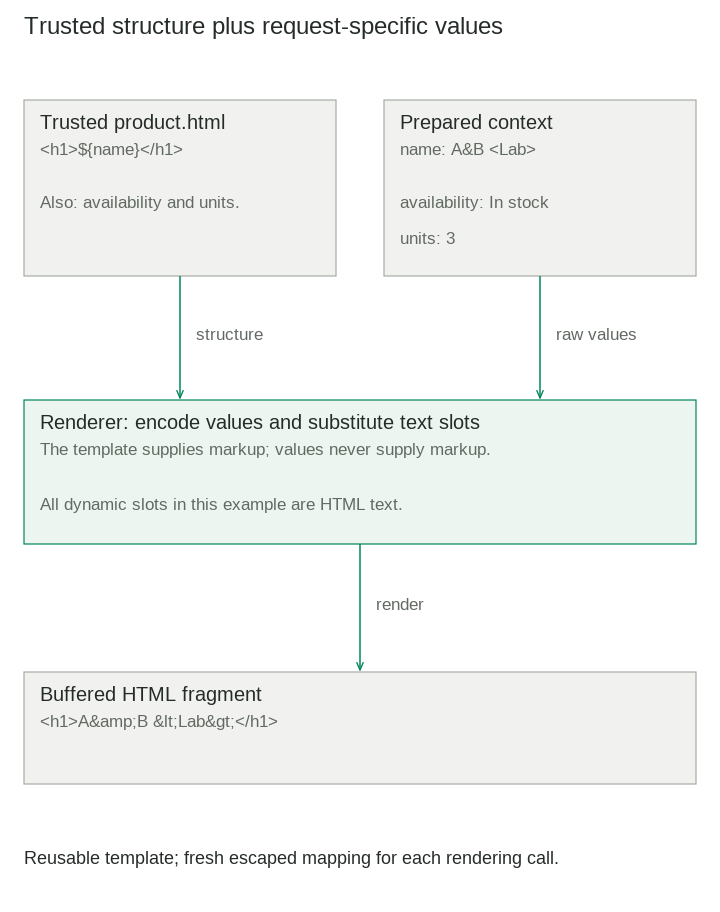
Template View starts with the response's HTML structure and places markers where dynamic information belongs. A renderer resolves those markers using data for the current rendering operation.
Think stable page structure plus explicit dynamic slots. Fowler's catalog entry describes HTML pages containing markers for dynamic information. The pattern is about organizing output; it does not require one template language, server framework, or rendering location.
Template View is different from GoF Template Method, which organizes an algorithm through overridable steps. A template is also not the domain model: it describes how selected information appears.
How it works
Give the template a deliberate data contract
The template contains markup, expressions, and sometimes presentation-level repetition or conditions. Application code selects the appropriate template and supplies its context: the values the template expects. Jinja's template documentation shows variables, loops, and conditional constructs as template-language features.
Here preparation produces a product name, an availability label, and a units string before rendering. This is a design choice that keeps data access and business decisions outside the example template. A real application should avoid templates triggering hidden database queries through lazily loaded objects, especially inside loops.
Use one name for each field and decide how missing values behave. Silent blanks can disguise a broken context contract; explicit errors make the defect visible. Optional fields need deliberate defaults or conditional presentation rather than accidental omission.
Encode values for their destination
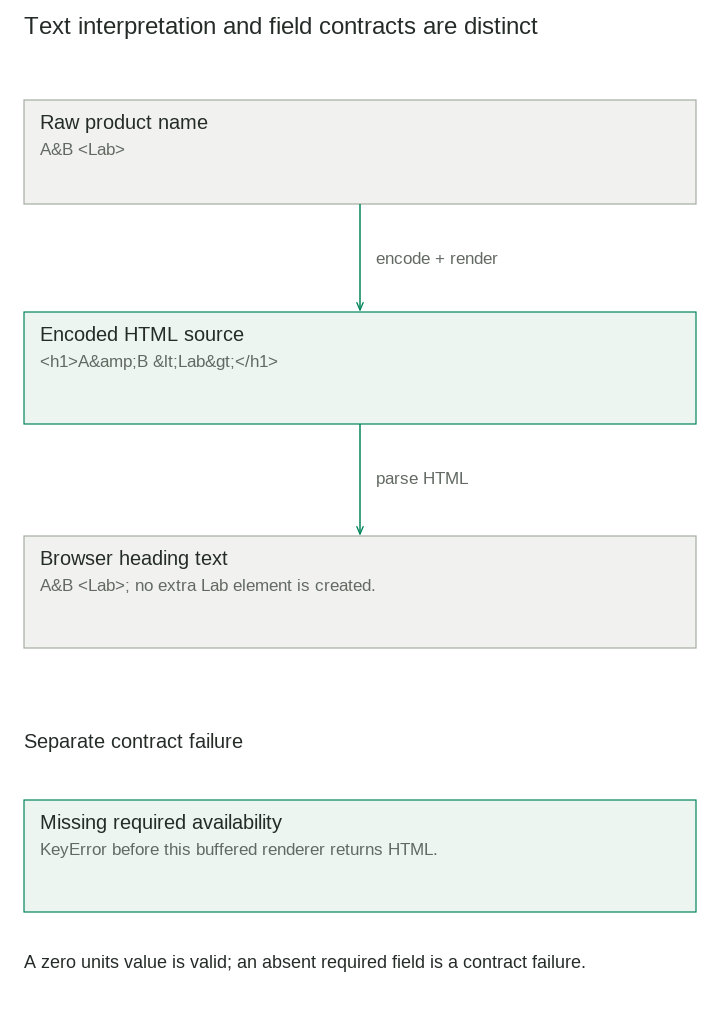
Substitution and output escaping are separate operations. Python's string.Template substitutes values but does not automatically make them safe HTML. The example applies html.escape before substituting values into HTML text slots.
OWASP's output-encoding guidance distinguishes HTML text, attributes, URLs, scripts, and other contexts. HTML escaping alone is not a general solution for JavaScript, CSS, or URL validation. The example intentionally has no dynamic attributes, URLs, scripts, or raw HTML fragments.
Templates are trusted application assets, while product names are data. Do not let a request supply arbitrary template source or choose an unrestricted template file. In richer engines, bypassing automatic escaping with a safe/raw flag is an explicit trust decision, not a formatting convenience.
Separate reusable configuration from each render
Loaders and parsed templates can be reused. Context belongs to an individual render, not a shared global dictionary containing the current user's values. Jinja's API documentation describes environment configuration, loaders, caching, and explicit autoescape setup.
The example reads its fixed template once when the module loads and creates a fresh escaped mapping per call. A changed template therefore requires reloading the module. A production loader can have a different reload policy.
Rendering is not a transaction. If data changes after preparation, the generated page remains a representation of the values supplied. If rendering fails after a business operation succeeds, repeating that operation can duplicate work. Streaming output introduces another boundary: after sending part of a response, replacing it with a complete error page may be impossible.
Worked example
A product card with three text slots
Previously, a handler joined tags and raw product values. Now product.html owns the structure, product_context prepares display values, and render_product performs escaping and substitution. Save these three files together and run python3 demo.py with Python 3.10+; no packages are required.
Inputs are a nonblank product name and a nonnegative whole number of available units, excluding booleans. The context contains raw, unescaped strings. The result is a buffered HTML fragment, not a complete HTTP response or live stock guarantee.
product.html — trusted structure with dynamic text markers
<article class="product-card">
  <h1>${name}</h1>
  <p>${availability}</p>
  <p>Units available: ${units}</p>
</article>
view.py — prepare values and render the template
from html import escape
from pathlib import Path
from string import Template


_CARD = Template(Path(__file__).with_name("product.html").read_text(encoding="utf-8"))


def product_context(name, available_units):
    if type(name) is not str or not name.strip():
        raise ValueError("Product name required")
    if type(available_units) is not int or available_units < 0:
        raise ValueError("Units must be a nonnegative integer")
    return {
        "name": name,
        "availability": "In stock" if available_units else "Unavailable",
        "units": str(available_units),
    }


def render_product(context):
    if any(type(value) is not str for value in context.values()):
        raise TypeError("View values must be strings")
    encoded = {key: escape(value, quote=True) for key, value in context.items()}
    return _CARD.substitute(encoded)
demo.py — normal output, zero stock, and an incomplete context
from view import product_context, render_product
context = product_context("A&B <Lab>", 3)
print(render_product(context).strip())
print(product_context("Empty shelf", 0)["availability"])
try:
render_product({"name": "Missing fields"})
except KeyError as error:
print("Missing field:", error.args[0])
# <article class="product-card">
# <h1>A&B <Lab></h1>
# <p>In stock</p>
# <p>Units available: 3</p>
# </article>
# Unavailable
# Missing field: availability
The browser displays A&B <Lab> as text inside the heading. Substitution does not recursively interpret marker-like text inside a value. A missing required marker raises KeyError; this buffered function returns no partial fragment. A real controller should turn rendering failure into its chosen error response without exposing internal details.
A repeated order summary
An order page can use a richer engine to loop over prepared line items and conditionally show an empty state. Jinja supports those constructs, but the same separation holds: calculate permissions, totals, and data access outside repeated markup where practical. Template inheritance or includes can share layout; neither replaces the contract for each view's data.
When to use it
Use Template View when HTML structure dominates the output and values vary by request, when layout should remain readable as markup, or when several pages can share partials and layouts.
For a tiny fixed string, a direct formatter may suffice. For non-HTML output, select a format-appropriate serializer or template policy rather than assuming HTML escaping applies.
Tradeoffs and common mistakes
Templates can accumulate service calls, authorization decisions, and difficult-to-test conditions. Extract complex decisions into prepared presentation data while keeping simple display repetition readable.
Avoid storing already escaped values as ordinary domain data: another render may escape them again. Also, safe_substitute concerns missing placeholders; its name does not promise HTML safety. Rendering an empty string instead of reporting a missing contract field can hide defects.
A template cache is different from a cache of rendered personalized pages. Reusing compiled structure is useful; sharing a rendered response under an insufficient cache key can expose the wrong content. Template View itself supplies neither authorization nor cache isolation.
Related patterns
Model-View-Controller can use a Template View for its presentation role while controllers coordinate input and model operations.
Presentation Model / MVVM organizes UI state and behavior. A template consumes selected presentation values; it does not automatically own an editing session or synchronize live controls.
Front Controller can select a handler whose result chooses a template and context. Request dispatch and output construction remain distinct responsibilities.
Template Method defines algorithm steps and variation through inheritance. Its shared word does not mean HTML markers or text substitution.
Sources
Fowler's Template View establishes the pattern. The linked Python documentation supports the exact substitution and encoding behavior; Jinja documents richer template and loader mechanisms; OWASP supports the context-specific output distinction.
The product-card scenario, order-summary explanation, code, and illustrations are original teaching material.